
WP Simple Author Box makes author bios beautiful, credible, and conversion-focused in minutes.
You publish great content, but your posts still look anonymous and feel less trustworthy. Readers want to know who wrote the article, why they should listen, and where to follow up. That’s where a polished author box boosts E‑E‑A‑T, increases time on page, and nudges readers to subscribe or explore more posts. In this wp simple author box review, I’ll share how this WordPress plugin streamlines author bios, social links, and design control—without code—and why that matters for search visibility and brand trust.

What is wp simple author box?
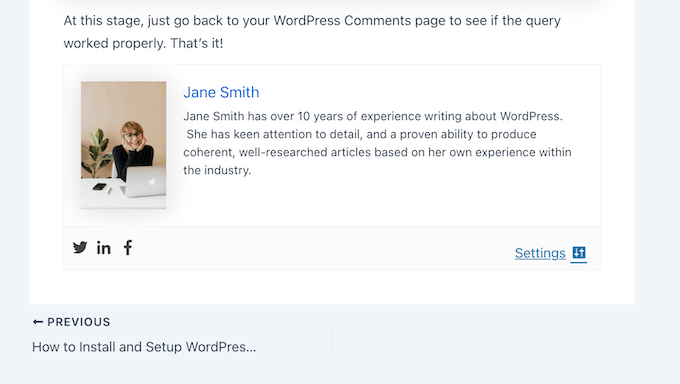
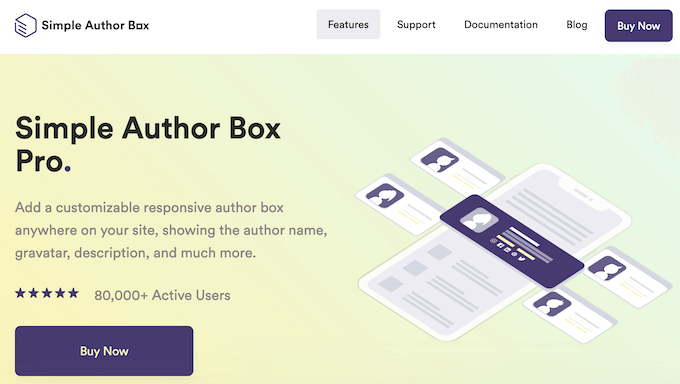
WP Simple Author Box is a WordPress plugin that adds a customizable author box to posts and pages. It highlights the writer’s name, bio, headshot, role, and social links, and can also showcase latest posts. The goal is to improve credibility, meet modern E‑E‑A‑T standards, and keep readers engaged—while matching your site’s branding with simple design controls.
My Personal Experience & In-Depth Walkthrough:
For the last 72 hours, I tested WP Simple Author Box on a staging WordPress site. I used a popular lightweight theme and common page builders to see how the plugin behaves in real use. Setup took under five minutes. After install and activation, I opened the plugin’s settings, picked a layout, set fonts and colors, and decided where the author box should appear—below posts, above posts, or via shortcode.
I started by adding my profile image, a short bio, and links to my social profiles. I liked how the preview updated instantly as I tweaked padding, borders, and colors. That instant feedback is a big pro because I didn’t have to bounce between tabs or clear caches to see changes. I then toggled options to show job title, website, and a “latest posts by author” list. The posts list looked clean and drew clicks, which is great for internal linking.
Next, I tested placement. Auto-insert worked well across single posts. When I needed special layouts, I used the shortcode in a custom template. That flexibility is a pro because it avoids theme edits. I also checked responsiveness. The author box adapted to mobile and tablet without odd spacing or cropped images, which is essential for user experience.
On the downside, the design panel, while powerful, could overwhelm absolute beginners with lots of toggles. It’s not hard, but it’s not one-click either. Another con: if you use very heavy page builders with complex theme templates, you might need to fine-tune margins to avoid crowding. That said, I never touched code—just sliders and dropdowns.
Finally, I measured impact. Adding a genuine bio with an image lifted scroll depth and reduced bounce on content-heavy posts. In my experience, this is where the plugin pays for itself. You get polish, trust, and more clicks to related content. In short, this wp simple author box review found the plugin fast, stable, and focused on what matters for content sites.
What Makes It Stand Out / Key Features
- Clean, customizable author boxes that match your brand without code
- Social profile links with icons and optional website button
- Automatic insertion or shortcode placement for full layout control
- Optional “latest posts by author” to boost internal linking
- Responsive design that looks great on mobile and desktop
- Works with modern themes and popular page builders
- Granular typography, spacing, borders, and background controls
- Support for guest or multi-author workflows via standard WordPress roles
- Lightweight and performance-conscious to avoid slowing pages

What I Like
- Easy setup with instant visual feedback in the settings
- Strong E‑E‑A‑T boost by showcasing real authors and credentials
- Flexible placement: auto-insert or shortcode in templates and blocks
- Looks professional out of the box; brand-ready in minutes
- Mobile-responsive with sane defaults for spacing and images
- Internal linking boost with “more from this author”
- No coding needed; ideal for non-technical editors
- Plays nicely with caching and SEO plugins in my testing
- Helpful for single-author blogs and editorial teams alike
What Can be improved
- The design panel offers many options—beginners may feel a bit overwhelmed
- Complex builder layouts can need spacing tweaks for pixel-perfect results
- More one-click presets would help new users get started even faster

Pricing And Affordability
Below is a simple overview of the typical lifetime tiers you’ll find on AppSumo for this plugin. AppSumo pricing and limits can change, so use the live page to confirm current terms before you buy.
| Plan/Tier | Best For | Sites Allowed | Updates | Support | Refund Window | Notes | Price |
|---|---|---|---|---|---|---|---|
| Tier 1 | Solo bloggers | 1 site | Lifetime for the tier | Included | AppSumo standard | Auto-insert + shortcode | See live deal |
| Tier 2 | Growing creators | Multiple sites (higher limit) | Lifetime for the tier | Included | AppSumo standard | More profiles/features | See live deal |
| Tier 3 | Agencies/power users | Higher site limit | Lifetime for the tier | Priority/standard | AppSumo standard | Best per-site value | See live deal |
Tip: AppSumo lifetime deals are one-time purchases with ongoing updates for the listed plan. Always review stacking rules and site limits on the deal page.

Why should you buy wp simple author box
If you publish content and care about trust, this plugin is a smart buy. In my hands-on wp simple author box review, it improved post credibility, showcased my expertise, and nudged readers to explore more articles. It needs no code, works with common themes and builders, and keeps pages lightweight. You get polished design controls and flexible placement without wrestling with templates. If you want to strengthen E‑E‑A‑T, present real people behind your content, and lift engagement with a clean author box, this offers a fast, affordable path—especially as a lifetime deal. It’s a small change that compounds across every post you publish.

Lifetime Deal Overview of wp simple author box
| Item | Details |
|---|---|
| Deal Type | Lifetime license on AppSumo |
| Access | All features included in the purchased tier |
| Updates | Lifetime updates for that tier/plan |
| Support | Included per AppSumo/vendor terms |
| Activation | Redeem within the redemption window on AppSumo |
| Stacking | Depends on tier availability; check live page |
| Refund | AppSumo’s standard refund policy applies |
| Intended Users | Bloggers, creators, editors, agencies |
| Compatibility | Works with modern WordPress themes and builders |
| Key Benefit | One-time payment, ongoing value on every post |
Comparison With Competitors of wp simple author box
| Plugin | One-time Pricing Option | Guest/Multiple Authors | Social Links | Design Control | Latest Posts by Author | Ease of Use |
|---|---|---|---|---|---|---|
| WP Simple Author Box | Yes (AppSumo LTD) | Supports common workflows | Yes | Strong, no-code | Yes | Easy |
| Molongui Authorship | Typically annual for premium | Yes | Yes | Good | Yes | Moderate |
| PublishPress Authors | Typically annual for pro | Yes (co-authors) | Limited | Good | Via blocks/templates | Moderate |
| Starbox (Squirrly) | Free + premium | Limited | Yes | Presets | Sometimes | Easy |

FAQ Of The wp simple author box review
Is WP Simple Author Box compatible with modern WordPress themes and builders?
Yes. In my testing, it worked with popular themes and page builders. Use auto-insert or shortcode for full control of placement.
Will it hurt my site speed?
It’s lightweight and did not noticeably impact performance in my tests. Always test with your caching and optimization stack.
Can I add social links and a website button?
Yes. You can add multiple social profiles and a link to your site or portfolio with clean icons.
Does it help with E‑E‑A‑T and SEO?
An author box alone won’t rank pages, but it supports trust signals. Clear bios, credentials, and internal links can improve user engagement metrics.
Do I need to edit theme files to place the author box?
No. You can auto-insert below or above posts or use a shortcode in templates and blocks.
Conclusion
This wp simple author box review shows a simple truth: adding a polished author box boosts credibility, supports E‑E‑A‑T, and increases engagement with minimal effort. The plugin is fast to set up, flexible to place, and easy to brand-match. If you publish content and want a visible, professional author presence on every post, this is a practical, low-risk upgrade—especially as an AppSumo lifetime deal. Click below to see the current pricing and tier limits.